
txt.edit - Simple Text Editor2.3.0 - App Store
You'll be able to see results in few seconds.
Publisher Description

WHAT'S NEW IN v2.3
. Command palette - Every action, sample and recent file in one search
. Format Document - Built-in Prettier for JavaScript, JSON, HTML, CSS, Markdown and YAML
. Symbol outline & minimap - Find your way around big files
. Coding keyboard row - Brackets, symbols and cursor keys above the keyboard
. Document statistics - Words, reading time and code metrics
WHY TXT.EDIT?
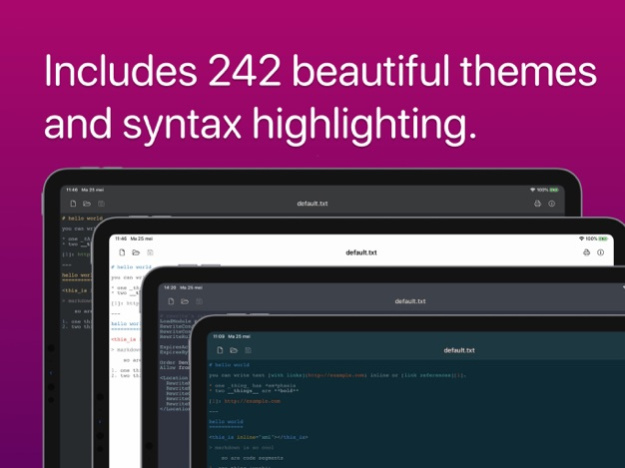
. 191 programming languages with syntax highlighting
. 242 beautiful themes for any mood or workflow
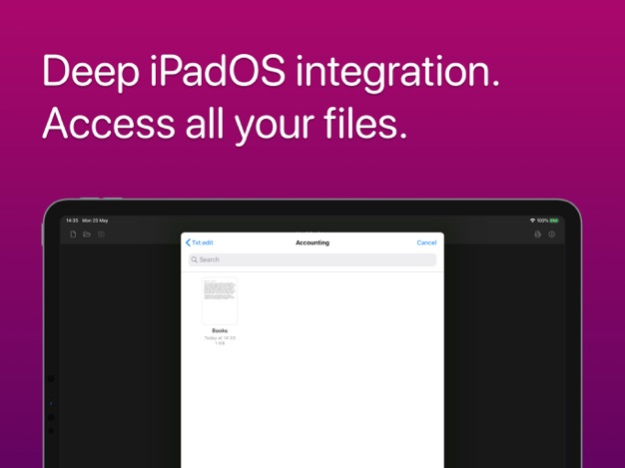
. iCloud integration - Access files anywhere
. Zero ads, zero subscriptions - Pay once, own forever
. Files app integration - Work with any cloud service
POWER FEATURES
. Syntax highlighting for HTML, JavaScript, JSON, Markdown, Swift, Python, PHP, YAML, and 183 more
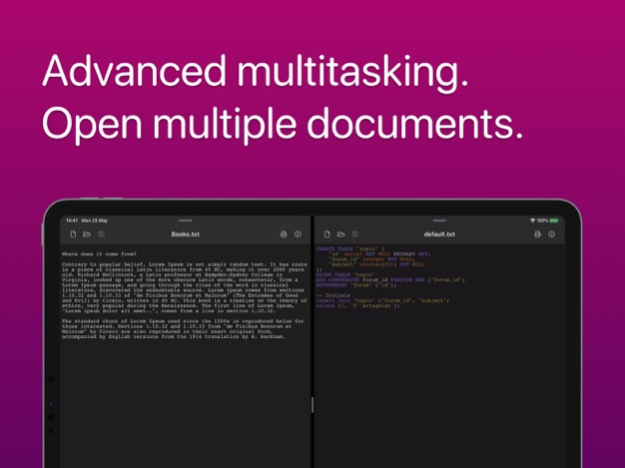
. Multiple tabs - Edit several files simultaneously
. Open and save files from iCloud, Dropbox, Google Drive
. Search and replace
. Customizable fonts and sizes
. Professional line numbers
. Multiple encoding support
Perfect for developers, writers, students, and anyone who values clean, distraction-free text editing.
One-time purchase. No subscriptions. No ads. Just pure text editing.
Version History txt.edit 2.3 is our biggest update yet.
• Command palette: search every action, sample and recent file in one place (⇧⌘P)
• Format Document: tidy JavaScript, TypeScript, JSON, HTML, CSS, Markdown and YAML with built-in Prettier
• Symbol outline: jump straight to functions, types and headings
• Minimap: a bird's-eye view of your document (turn it on in Settings)
• Coding keyboard row: tab, brackets, symbols and cursor keys right above the keyboard, plus theme, language and tools
• Document statistics: tap the word count for reading time, code metrics and more
• Smarter editing: auto-indent, bracket pairing and matching-bracket highlights
• Sample documents: a Welcome guide and samples for many languages, in your iCloud Drive
• New Settings screen
Fixes
• The line you're typing no longer hides behind the keyboard. The editor now scrolls with your cursor
• Swipe down on your text to dismiss the keyboard
• Small files no longer trigger the large-file restore prompt 2.3.0 Oct 2 v2.1 — Added 26+ file types, word count, Spotlight indexing, haptic feedback, and fixed large file crashes. 2.1.0 Feb 14 Small bugfixes. 2.0.1 11/02/2025 MAJOR UPDATE - txt.edit v2.0
Welcome to the biggest txt.edit update ever! We've rebuilt the app with features you've been requesting.
NEW FEATURES
• Multiple Tabs - Edit several files at once with a beautiful tab interface
• Custom Fonts - Choose from system fonts and set your ideal size for perfect readability
• Line Numbers - Professional code editing with toggleable line numbers
• Font Size Control - Adjust text size on the fly
DESIGN REFRESH
• Modern, refined interface
• Improved navigation
• Enhanced performance 2.0 10/26/2025 - Added support for handlebars files (.hbs/.handlebars) 1.1.1 02/01/2022 This version packs an updated version of our highlight/theme engine. txt.edit now has 242 themes & syntax highlighting for 191 languages. 1.1 11/24/2021 - Support for LaTex files 1.0.4 11/22/2021 Support for GPX and other XML-based formats! 1.0.3 11/16/2021 I've added a button to show word and character counts! 1.0.2 06/12/2020 I've removed Firebase Analytics in this small update. You shouldn't be tracked by Big Tech in a simple text editor. 1.0.1 06/10/2020 1.0 05/29/2020
About txt.edit - Simple Text Editor
The company that develops txt.edit - Simple Text Editor is Titans of Industry. The latest version released by its developer is 2.3.0.
To install txt.edit - Simple Text Editor on your iOS device, just click the green Continue To App button above to start the installation process. The app is listed on our website since 2026-10-14 and was downloaded 0 times. We have already checked if the download link is safe, however for your own protection we recommend that you scan the downloaded app with your antivirus. Your antivirus may detect the txt.edit - Simple Text Editor as malware if the download link is broken.
How to install txt.edit - Simple Text Editor on your iOS device:
- Click on the Continue To App button on our website. This will redirect you to the App Store.
- Once the txt.edit - Simple Text Editor is shown in the iTunes listing of your iOS device, you can start its download and installation. Tap on the GET button to the right of the app to start downloading it.
- If you are not logged-in the iOS appstore app, you'll be prompted for your your Apple ID and/or password.
- After txt.edit - Simple Text Editor is downloaded, you'll see an INSTALL button to the right. Tap on it to start the actual installation of the iOS app.
- Once installation is finished you can tap on the OPEN button to start it. Its icon will also be added to your device home screen.
Program Details
System requirements
Download information
Pricing
Version History
version 2.3.0
posted on 2026-10-14
Version History txt.edit 2.3 is our biggest update yet.
• Command palette: search every action, sample and recent file in one place (⇧⌘P)
• Format Document: tidy JavaScript, TypeScript, JSON, HTML, CSS, Markdown and YAML with built-in Prettier
• Symbol outline: jump straight to functions, types and headings
• Minimap: a bird's-eye view of your document (turn it on in Settings)
• Coding keyboard row: tab, brackets, symbols and cursor keys right above the keyboard, plus theme, language and tools
• Document statistics: tap the word count for reading time, code metrics and more
• Smarter editing: auto-indent, bracket pairing and matching-bracket highlights
• Sample documents: a Welcome guide and samples for many languages, in your iCloud Drive
• New Settings screen
Fixes
• The line you're typing no longer hides behind the keyboard. The editor now scrolls with your cursor
• Swipe down on your text to dismiss the keyboard
• Small files no longer trigger the large-file restore prompt 2.3.0 Oct 2 v2.1 — Added 26+ file types, word count, Spotlight indexing, haptic feedback, and fixed large file crashes. 2.1.0 Feb 14 Small bugfixes. 2.0.1 11/02/2025 MAJOR UPDATE - txt.edit v2.0
Welcome to the biggest txt.edit update ever! We've rebuilt the app with features you've been requesting.
NEW FEATURES
• Multiple Tabs - Edit several files at once with a beautiful tab interface
• Custom Fonts - Choose from system fonts and set your ideal size for perfect readability
• Line Numbers - Professional code editing with toggleable line numbers
• Font Size Control - Adjust text size on the fly
DESIGN REFRESH
• Modern, refined interface
• Improved navigation
• Enhanced performance 2.0 10/26/2025 - Added support for handlebars files (.hbs/.handlebars) 1.1.1 02/01/2022 This version packs an updated version of our highlight/theme engine. txt.edit now has 242 themes & syntax highlighting for 191 languages. 1.1 11/24/2021 - Support for LaTex files 1.0.4 11/22/2021 Support for GPX and other XML-based formats! 1.0.3 11/16/2021 I've added a button to show word and character counts! 1.0.2 06/12/2020 I've removed Firebase Analytics in this small update. You shouldn't be tracked by Big Tech in a simple text editor. 1.0.1 06/10/2020 1.0 05/29/2020
version 2.3.0
posted on 2026-10-06
Version History txt.edit 2.3 is our biggest update yet.
• Command palette: search every action, sample and recent file in one place (⇧⌘P)
• Format Document: tidy JavaScript, TypeScript, JSON, HTML, CSS, Markdown and YAML with built-in Prettier
• Symbol outline: jump straight to functions, types and headings
• Minimap: a bird's-eye view of your document (turn it on in Settings)
• Coding keyboard row: tab, brackets, symbols and cursor keys right above the keyboard, plus theme, language and tools
• Document statistics: tap the word count for reading time, code metrics and more
• Smarter editing: auto-indent, bracket pairing and matching-bracket highlights
• Sample documents: a Welcome guide and samples for many languages, in your iCloud Drive
• New Settings screen
Fixes
• The line you're typing no longer hides behind the keyboard. The editor now scrolls with your cursor
• Swipe down on your text to dismiss the keyboard
• Small files no longer trigger the large-file restore prompt 2.3.0 4d ago v2.1 — Added 26+ file types, word count, Spotlight indexing, haptic feedback, and fixed large file crashes. 2.1.0 Feb 14 Small bugfixes. 2.0.1 11/02/2025 MAJOR UPDATE - txt.edit v2.0
Welcome to the biggest txt.edit update ever! We've rebuilt the app with features you've been requesting.
NEW FEATURES
• Multiple Tabs - Edit several files at once with a beautiful tab interface
• Custom Fonts - Choose from system fonts and set your ideal size for perfect readability
• Line Numbers - Professional code editing with toggleable line numbers
• Font Size Control - Adjust text size on the fly
DESIGN REFRESH
• Modern, refined interface
• Improved navigation
• Enhanced performance 2.0 10/26/2025 - Added support for handlebars files (.hbs/.handlebars) 1.1.1 02/01/2022 This version packs an updated version of our highlight/theme engine. txt.edit now has 242 themes & syntax highlighting for 191 languages. 1.1 11/24/2021 - Support for LaTex files 1.0.4 11/22/2021 Support for GPX and other XML-based formats! 1.0.3 11/16/2021 I've added a button to show word and character counts! 1.0.2 06/12/2020 I've removed Firebase Analytics in this small update. You shouldn't be tracked by Big Tech in a simple text editor. 1.0.1 06/10/2020 1.0 05/29/2020
version 2.3.0
posted on 2026-10-02
Version History txt.edit 2.3 is our biggest update yet.
• Command palette: search every action, sample and recent file in one place (⇧⌘P)
• Format Document: tidy JavaScript, TypeScript, JSON, HTML, CSS, Markdown and YAML with built-in Prettier
• Symbol outline: jump straight to functions, types and headings
• Minimap: a bird's-eye view of your document (turn it on in Settings)
• Coding keyboard row: tab, brackets, symbols and cursor keys right above the keyboard, plus theme, language and tools
• Document statistics: tap the word count for reading time, code metrics and more
• Smarter editing: auto-indent, bracket pairing and matching-bracket highlights
• Sample documents: a Welcome guide and samples for many languages, in your iCloud Drive
• New Settings screen
Fixes
• The line you're typing no longer hides behind the keyboard. The editor now scrolls with your cursor
• Swipe down on your text to dismiss the keyboard
• Small files no longer trigger the large-file restore prompt 2.3.0 13h ago v2.1 — Added 26+ file types, word count, Spotlight indexing, haptic feedback, and fixed large file crashes. 2.1.0 Feb 14 Small bugfixes. 2.0.1 11/02/2025 MAJOR UPDATE - txt.edit v2.0
Welcome to the biggest txt.edit update ever! We've rebuilt the app with features you've been requesting.
NEW FEATURES
• Multiple Tabs - Edit several files at once with a beautiful tab interface
• Custom Fonts - Choose from system fonts and set your ideal size for perfect readability
• Line Numbers - Professional code editing with toggleable line numbers
• Font Size Control - Adjust text size on the fly
DESIGN REFRESH
• Modern, refined interface
• Improved navigation
• Enhanced performance 2.0 10/26/2025 - Added support for handlebars files (.hbs/.handlebars) 1.1.1 02/01/2022 This version packs an updated version of our highlight/theme engine. txt.edit now has 242 themes & syntax highlighting for 191 languages. 1.1 11/24/2021 - Support for LaTex files 1.0.4 11/22/2021 Support for GPX and other XML-based formats! 1.0.3 11/16/2021 I've added a button to show word and character counts! 1.0.2 06/12/2020 I've removed Firebase Analytics in this small update. You shouldn't be tracked by Big Tech in a simple text editor. 1.0.1 06/10/2020 1.0 05/29/2020
version 2.1.0
posted on 2026-09-25
Version History v2.1 — Added 26+ file types, word count, Spotlight indexing, haptic feedback, and fixed large file crashes. 2.1.0 Feb 14 Small bugfixes. 2.0.1 11/02/2025 MAJOR UPDATE - txt.edit v2.0
Welcome to the biggest txt.edit update ever! We've rebuilt the app with features you've been requesting.
NEW FEATURES
• Multiple Tabs - Edit several files at once with a beautiful tab interface
• Custom Fonts - Choose from system fonts and set your ideal size for perfect readability
• Line Numbers - Professional code editing with toggleable line numbers
• Font Size Control - Adjust text size on the fly
DESIGN REFRESH
• Modern, refined interface
• Improved navigation
• Enhanced performance 2.0 10/26/2025 - Added support for handlebars files (.hbs/.handlebars) 1.1.1 02/01/2022 This version packs an updated version of our highlight/theme engine. txt.edit now has 242 themes & syntax highlighting for 191 languages. 1.1 11/24/2021 - Support for LaTex files 1.0.4 11/22/2021 Support for GPX and other XML-based formats! 1.0.3 11/16/2021 I've added a button to show word and character counts! 1.0.2 06/12/2020 I've removed Firebase Analytics in this small update. You shouldn't be tracked by Big Tech in a simple text editor. 1.0.1 06/10/2020 1.0 05/29/2020
version 2.1.0
posted on 2026-02-14
v2.1 — Added 26+ file types, word count, Spotlight indexing, haptic feedback, and fixed large file crashes.
version 1.1.1
posted on 2022-02-01
Feb 1, 2022
Version 1.1.1
- Added support for handlebars files (.hbs/.handlebars)
version 1.1
posted on 2021-11-24
Nov 24, 2021 Version 1.1
This version packs an updated version of our highlight/theme engine. txt.edit now has 242 themes & syntax highlighting for 191 languages.
Disclaimer
Official App Store Link
We do not host txt.edit - Simple Text Editor on our servers. We did not scan it for viruses, adware, spyware or other type of malware. This app is hosted by Apple and passed their terms and conditions to be listed there. We recommend caution when installing it.
The App Store link for txt.edit - Simple Text Editor is provided to you by apps112.com without any warranties, representations or guarantees of any kind, so access it at your own risk.
If you have questions regarding this particular app contact the publisher directly. For questions about the functionalities of apps112.com contact us.
